Retrosynthetic Planning#
This tutorial demonstrates how retrosynthetic planning can be performed for target molecules in SynPlanner. For retrosynthetic planning, the retrosynthetic models trained with the previous tutorials can be used. Alternatively, the pre-trained retrosynthetic models downloaded from SynPlanner can be used.
Basic recommendations#
1. The “Evaluation first” search strategy is not compatible with the rollout evaluation
In SynPlanner, there are two main search strategies implemented - the “Expansion first” and “Evaluation first” strategy. These are the strategies for navigating the search tree. “Expansion first” prioritizes the expansion of new nodes and assigns to each new node the default value. “Evaluation first” prioritizes the evaluation of each new node first. Notice, that the usage of the “Evaluation first” strategy with the current implementation of the rollout function in SynPlanner is not
reasonable in terms of the total search time because of the time-consuming execution of the rollout function. Also, the current implementation of the rollout function may mislead the search in the case of the “Evaluation first” strategy due to the limited exploration of the tree in rollout simulations. Therefore, the current recommendation is to use the “Evaluation first” strategy with value network evaluation only.
2. Try more search iterations (and longer search time) with complex molecules, a limited set of reaction rules, or building blocks
Some target molecules (usually more complex and bigger molecules) require longer tree searches to be successfully solved and may require longer retrosynthesis routes. The same is true, if there is only a small set of reaction rules or building blocks, which again requires for longer analysis to find the proper combination of reaction rules leading to the limited amount of building blocks. In these cases, the increase in the number of search iterations may help to find the successful retrosynthesis route for the given molecule.
1. Set up input and output data locations#
The SynPlanner input data will be downloaded from the HuggingFace repository to the specified directory.
For the retrosynthetic planning the following data and files are needed:
Data / Files |
Description |
|---|---|
Reaction rules |
Extracted reaction rules for precursors dissection in retrosynthetic planning |
Policy network |
Trained ranking or filtering policy network for node expansion in tree search |
Value network |
Trained value neural network for node evaluation in tree search (optional, the default evaluation method is rollout) |
Building blocks |
Set of building block molecules, which are used as terminal materials in the retrosynthetic route planning |
[1]:
from pathlib import Path
from synplan.utils.loading import download_preset

# download SynPlanner preset data
paths = download_preset("synplanner-article", save_to="synplan_data")
ranking_policy_network = paths["ranking_policy"]
reaction_rules_path = paths["reaction_rules"]
# use your custom building blocks if needed
building_blocks_path = paths["building_blocks"]

# planning results folder
results_folder = Path("tutorial_results").resolve()
results_folder.mkdir(exist_ok=True)
2. Tree search configuration#
The search tree in SynPlanner is represented by Tree class, which requires:
loaded building blocks provided as chython
MoleculeContainerobjectsloaded reaction rules provided as chython
Reactorobjectsloaded expansion function represented as trained policy network.
tree configuration of SynPlanner
TreeConfigobjecttarget molecule provided as chython
MoleculeContainerobject
Loading building blocks#
Building blocks can be loaded with the load_building_blocks function. They can be loaded from a .smi file containing SMILES.
Warning
The first loading of building blocks can be long, especially if they are loaded from a SMILES file.
[ ]:
from synplan.utils.loading import load_building_blocks

building_blocks = load_building_blocks(building_blocks_path, standardize=True, silent=False)
Loading reaction rules#
Reaction rules can be loaded with the load_reaction_rules function that will automatically convert them to chython Reactor objects. They can be loaded from a .tsv file (preferred) or from a legacy .pickle file.
For more information, please visit rules extraction tutorial.
[3]:
from synplan.utils.loading import load_reaction_rules

reaction_rules = load_reaction_rules(reaction_rules_path)
Loading policy network#
Policy function can be loaded directly from the weights file ends with .ckpt, as it includes all configuration for the policy network used for its training
Note
The PolicyNetworkConfig parameters are ignored when the .ckpt file is provided, as it already contains all parameter values
For more info, please visit ranking policy training tutorial.
[4]:
from synplan.utils.loading import load_policy_function

policy_function = load_policy_function(weights_path=ranking_policy_network)
Lightning automatically upgraded your loaded checkpoint from v1.9.5 to v2.6.1. To apply the upgrade to your files permanently, run `python -m pytorch_lightning.utilities.upgrade_checkpoint synplan_data/policy/supervised_gcn/v1/v1/ranking_policy.ckpt`
Search configuration#
The next step is to configure the Monte-Carlo Tree Search. We do this using the TreeConfig class in SynPlanner. This class allows for the specification of various parameters and settings for the MCTS.
More details about MCTS configuration in SynPlanner can be found in official documentation.
[5]:
from synplan.utils.config import TreeConfig

tree_config = TreeConfig(
    search_strategy="expansion_first",
    max_iterations=300,
    max_time=120,
    max_depth=9,
    min_mol_size=1,
    init_node_value=0.5,
    ucb_type="uct",
    c_ucb=0.1,
)
Evaluation strategy configuration#
The evaluation strategy determines how nodes are scored during tree search. We create an evaluation configuration that contains all necessary dependencies.
[6]:
from synplan.utils.config import RolloutEvaluationConfig
from synplan.utils.loading import load_evaluation_function

# Create evaluation configuration
eval_config = RolloutEvaluationConfig(
    policy_network=policy_function,
    reaction_rules=reaction_rules,
    building_blocks=building_blocks,
    min_mol_size=tree_config.min_mol_size,
    max_depth=tree_config.max_depth,
)

# Create evaluator from config
evaluation_function = load_evaluation_function(eval_config)
Loading target molecule#
The target molecule needs to be loaded as a MoleculeContainer and must be standardized. The easiest way is to use the mol_from_smiles function from synplan.chem.utils.
For the search with multiple molecules, please visit advanced retrosynthetic planning tutorial.
[11]:
from synplan.chem.utils import mol_from_smiles

# let's take capivasertib used as anti-cancer medication for the treatment
# of breast cancer and approved by FDA in 2023
example_smiles = "NC1(C(=O)N[C@@H](CCO)c2ccc(Cl)cc2)CCN(c2nc[nH]c3nccc2-3)CC1"

target_molecule = mol_from_smiles(example_smiles, clean2d=True, standardize=True, clean_stereo=True)
Initialising tree#
Next, we initialise the Tree object, providing target molecule and loaded reaction rules, building blocks, expansion function, and evaluation strategy.
[12]:
from synplan.mcts.tree import Tree
from synplan.route_quality.scorer import ProtectionRouteScorer

# Protection-aware route scorer (uses bundled SMARTS and incompatibility matrix)
route_scorer = ProtectionRouteScorer.from_config()

tree = Tree(
    target=target_molecule,
    config=tree_config,
    reaction_rules=reaction_rules,
    building_blocks=building_blocks,
    expansion_function=policy_function,
    evaluation_function=evaluation_function,
    route_scorer=route_scorer,
)
3. Running retrosynthetic planning#
The Tree object is iterable, like List in Python. Each iteration represents one MCTS iteration, after which 2 values are returned:
solvedis boolean, ifTruethen a successful route was found during the current iteration.node_idis a list of indices of leaf nodes generated during the current iteration.
Once search is finished, the tree will print some stats:
[13]:
tree_solved = False
for solved, node_id in tree:
    if solved:
        tree_solved = True
tree
[13]:
Tree for: c1cc(ccc1Cl)C(NC(C2(CCN(CC2)c3c4cc[nH]c4ncn3)N)=O)CCO
Time: 17.7 seconds
Number of nodes: 3830
Number of iterations: 300
Number of visited nodes: 300
Number of found routes: 147
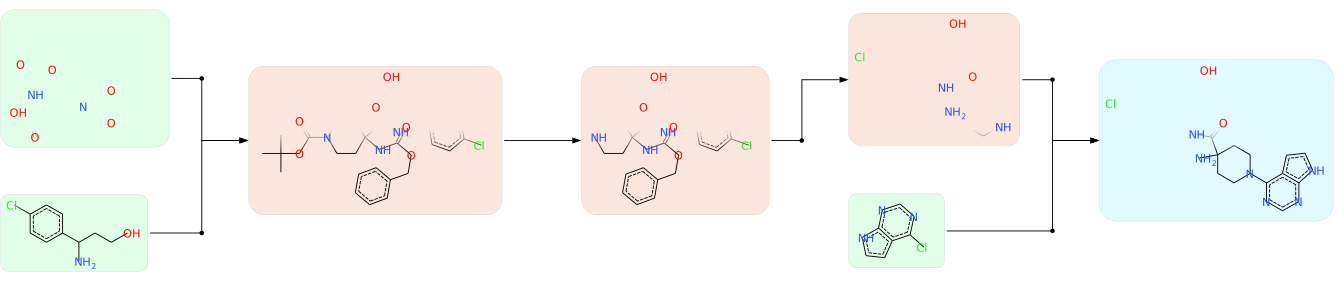
Visualizing predicted retrosynthetic routes#
After the tree search is complete, we can visualize the found retrosynthesis paths. The visualization uses the get_route_svg function from SynPlanner visualization interface.
[14]:
from IPython.display import SVG, display
from synplan.utils.visualisation import get_route_svg

for n, node_id in enumerate(tree.winning_nodes):
    print(
        f"-------- Path starts from node #{node_id} with total route score {tree.route_score(node_id)} --------"
    )
    display(SVG(get_route_svg(tree, node_id)))
    if n == 3:
        break
-------- Path starts from node #71 with total route score 0.08583571406612164 --------

-------- Path starts from node #72 with total route score 0.08583571406612164 --------

-------- Path starts from node #74 with total route score 0.08583571406612164 --------

-------- Path starts from node #164 with total route score 0.058497575581901634 --------
4. Saving search results#
After the search completes, the Tree object contains statistics about policy performance and search dynamics. These can be saved for later analysis or comparison across different configurations.
Saving search statistics#
The to_stats_dict() method returns a flat dictionary with all tree metrics (policy performance, search dynamics, branching factors, route quality). We save it as a CSV row — the same format used by the run_search CLI command.
[ ]:
import csv

stats = tree.to_stats_dict()
stats["target_smiles"] = example_smiles

csv_path = results_folder / "tree_search_stats.csv"
with open(csv_path, "w", newline="") as f:
    writer = csv.DictWriter(f, fieldnames=stats.keys())
    writer.writeheader()
    writer.writerow(stats)

print(f"Stats saved to {csv_path}")
for key, value in stats.items():
    print(f"  {key}: {value}")
Saving detailed analysis#
For deeper analysis (per-route details, winning rule ranks, branching profile), we save the full analysis as JSON. This can be loaded later in the Tree Analysis tutorial.
[ ]:
import json

analysis = {
    "target_smiles": example_smiles,
    "summary": tree.to_stats_dict(),
    "branching_profile": tree.branching_profile(),
    "winning_rule_ranks": tree.winning_rule_ranks(),
    "route_details": [
        tree.route_details(nid) for nid in tree.winning_nodes
    ],
    "routes_found_at": tree.stats["routes_found_at"],
}

json_path = results_folder / "tree_analysis.json"
with open(json_path, "w") as f:
    json.dump(analysis, f, indent=2, default=str)

print(f"Detailed analysis saved to {json_path}")
print(f"  {len(analysis['route_details'])} route details")
print(f"  {len(analysis['branching_profile'])} depth levels in branching profile")