Coming from RDKit#
This tutorial bridges the gap between RDKit and chython.
Chython is a pure-Python cheminformatics library with a Pythonic API, built-in atom-to-atom mapping, and the Condensed Graph of Reaction (CGR) representation. Critically, chython has built-in RDKit interoperability, so you can freely convert molecules between the two libraries and use them together.
This tutorial assumes you are comfortable with Python and RDKit. We won’t explain basic cheminformatics concepts but instead, we focus on the differences and the conversion workflow.
[1]:
from chython import smiles, smarts, MoleculeContainer, ReactionContainer
1. The Big Differences#
1.1 Atom Indexing: Arbitrary Keys vs 0-Based Indices#
In RDKit, atoms are accessed by a 0-based contiguous index: mol.GetAtomWithIdx(0), mol.GetAtomWithIdx(1), etc.
In chython, atoms have arbitrary integer keys that typically start from 1 and may have gaps. This is the single biggest source of confusion for RDKit users.
[2]:
mol = smiles('CCO')

# Iterate over atoms: yields (key, atom) pairs
for n, atom in mol.atoms():
    print(f'Key: {n}, Element: {atom.atomic_symbol}, Charge: {atom.charge}')

# Access a specific atom by key
# RDKit: mol.GetAtomWithIdx(0)
# Chython: mol.atom(1)  - NOT mol.atom(0)!
print(f'\nAtom with key 1: {mol.atom(1).atomic_symbol}')
Key: 1, Element: C, Charge: 0
Key: 2, Element: C, Charge: 0
Key: 3, Element: O, Charge: 0

Atom with key 1: C
[3]:
# Keys can have gaps after operations like substructure extraction
toluene = smiles('Cc1ccccc1')
sub = toluene.substructure([1, 3, 5, 7])  # extract some atoms
print('Atom keys in substructure:', list(sub.atoms_numbers))
# Note: keys are preserved from the original molecule, not renumbered 0..N
Atom keys in substructure: [1, 3, 5, 7]
1.2 Mutability: Edit Molecules In-Place#
In RDKit, molecule editing is done through RWMol objects.
In chython, MoleculeContainer is mutable - you can add/remove atoms and bonds directly on the molecule object.
[4]:
mol = smiles('C')
print('Before:', str(mol))

# Add an oxygen atom and connect it
n = list(mol.atoms_numbers)[0]  # get the carbon's key
o_key = mol.add_atom('O')       # returns the key of the new atom
mol.add_bond(n, o_key, 1)       # single bond
print('After adding O:', str(mol))

# You can also use transactions for safe multi-step edits
mol2 = smiles('CCO')
try:
    with mol2:  # start transaction
        mol2.delete_atom(list(mol2.atoms_numbers)[-1])  # remove last atom
        print('Inside transaction:', str(mol2))
    print('After commit:', str(mol2))
except Exception:
    print('Transaction rolled back')
Before: C
After adding O: CO
Inside transaction: CC
After commit: CC
1.3 Hashability and Equality#
In RDKit, molecule comparison and deduplication is typically done via canonical SMILES strings:
# RDKit
seen = set()
seen.add(Chem.MolToSmiles(mol))  # convert to string for hashing
Chython molecules are directly hashable and comparable. You can use them in sets, as dict keys, and compare with ==.
[5]:
mol1 = smiles('CCO')  # ethanol
mol2 = smiles('OCC')  # ethanol, different SMILES, same molecule

# Direct equality comparison
print('mol1 == mol2:', mol1 == mol2)

# Use in sets and dicts
mol_set = {mol1, mol2}
print('Set size:', len(mol_set))  # 1, because they represent the same molecule

mol_dict = {mol1: 'ethanol'}
print('Dict lookup:', mol_dict[mol2])  # works!

# Note: aromatic vs Kekule forms are NOT equal until canonicalized
aromatic = smiles('c1ccccc1')
kekule = smiles('C1=CC=CC=C1')
print('\naromatic == kekule:', aromatic == kekule)  # False!
kekule.thiele()  # aromatize the Kekule form
print('After thiele():  ', aromatic == kekule)  # True
mol1 == mol2: True
Set size: 1
Dict lookup: ethanol

aromatic == kekule: False
After thiele():   True
Warning: Because molecules are mutable AND hashable, modifying a molecule after putting it in a set or dict will break the container. Always work with copies if you need to mutate molecules that are stored in hash-based collections.
1.4 SMILES: str(mol) Instead of Chem.MolToSmiles(mol)#
Chython’s canonical SMILES is simply str(mol). No function call needed.
[6]:
mol = smiles('OCC(=O)O')

# RDKit: Chem.MolToSmiles(mol)
# Chython:
print('Canonical SMILES:', str(mol))

# Format strings for non-standard SMILES output
print('With atom mapping:', f'{mol:A}')   # include atom-to-atom mapping
print('With hydrogens:', f'{mol:h}')      # explicit hydrogens in SMILES
Canonical SMILES: C(O)C(=O)O
With atom mapping: C(O)C(=O)O
With hydrogens: [CH2]([OH])[C](=[O])[OH]
1.5 Aromaticity: thiele() / kekule() Instead of SetAromaticity() / Kekulize()#
RDKit |
Chython |
Notes |
|---|---|---|
|
|
Named after Thiele’s theory of partial valences |
|
|
Same concept, different name |
In chython, if you parse a Kekule SMILES, it stays in Kekule form until you explicitly call thiele().
[7]:
# Already aromatic from SMILES
aromatic = smiles('c1ccccc1')
print('Aromatic SMILES:', str(aromatic))

# Kekulize it
aromatic.kekule()
print('Kekule SMILES:', str(aromatic))

# Re-aromatize
aromatic.thiele()
print('Re-aromatized:', str(aromatic))
Aromatic SMILES: c1ccccc1
Kekule SMILES: C1=CC=CC=C1
Re-aromatized: c1ccccc1
1.6 Substructure Search: Operator Overloading#
RDKit: mol.HasSubstructMatch(query) returns True/False.
Chython: ``query < mol`` (reads as “query is a substructure of mol”). This is the < operator overloaded for chemical meaning.
[8]:
benzene = smiles('c1ccccc1')
toluene = smiles('Cc1ccccc1')
pyridine = smiles('c1ccncc1')

# Substructure check
# RDKit: toluene_rdkit.HasSubstructMatch(benzene_rdkit)
# Chython:
print('benzene < toluene:', benzene < toluene)   # True: benzene is a substructure of toluene
print('toluene < benzene:', toluene < benzene)   # False: toluene is NOT a substructure of benzene
print('benzene < pyridine:', benzene < pyridine) # False: pyridine has nitrogen
benzene < toluene: True
toluene < benzene: False
benzene < pyridine: False
[9]:
# Get atom mappings (equivalent to RDKit's GetSubstructMatches)
# RDKit returns tuples of 0-based indices
# Chython returns dicts of {query_key: mol_key}
query = smiles('c1ccccc1')
target = smiles('Cc1ccccc1')

for mapping in query.get_mapping(target):
    print('Mapping:', mapping)
    break  # just show the first one
Mapping: {1: 7, 2: 2, 3: 3, 4: 4, 5: 5, 6: 6}
2. Converting Between RDKit and Chython#
This is the key feature that lets you use both libraries together. Chython provides MoleculeContainer.from_rdkit() and mol.to_rdkit() for seamless conversion.
[10]:
from rdkit import Chem
from rdkit.Chem import AllChem, Descriptors
2.1 RDKit to Chython#
[11]:
# Parse with RDKit
rdkit_mol = Chem.MolFromSmiles('c1ccc(CC(=O)O)cc1')

# Convert to chython
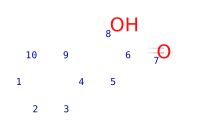
chython_mol = MoleculeContainer.from_rdkit(rdkit_mol)

print('Type:', type(chython_mol).__name__)
print('Canonical SMILES:', str(chython_mol))
chython_mol
Type: MoleculeContainer
Canonical SMILES: c1ccccc1CC(=O)O
[11]:
2.2 Chython to RDKit#
[12]:
# Parse with chython
chython_mol = smiles('c1ccc(CC(=O)O)cc1')

# Convert to RDKit
rdkit_mol = chython_mol.to_rdkit()

print('Type:', type(rdkit_mol).__name__)
print('RDKit SMILES:', Chem.MolToSmiles(rdkit_mol))
Type: RWMol
RDKit SMILES: [cH:1]1[cH:2][cH:3][c:4]([CH2:5][C:6](=[O:7])[OH:8])[cH:9][cH:10]1
[13]:
# to_rdkit() options:
# keep_mapping=True (default) - preserves atom map numbers
# keep_hydrogens=True (default) - preserves implicit hydrogen counts

rdkit_no_map = chython_mol.to_rdkit(keep_mapping=False)
print('Without atom mapping:', Chem.MolToSmiles(rdkit_no_map))
Without atom mapping: O=C(O)Cc1ccccc1
2.3 Round-Trip: Stereochemistry and Conformers#
The conversion preserves stereochemistry (tetrahedral and cis/trans) and conformer data.
[14]:
# Stereochemistry round-trip
rdkit_stereo = Chem.MolFromSmiles('C/C=C/C[C@@H](O)F')
chython_stereo = MoleculeContainer.from_rdkit(rdkit_stereo)
print('Chython SMILES:', str(chython_stereo))

# Convert back
rdkit_back = chython_stereo.to_rdkit()
print('RDKit SMILES:  ', Chem.MolToSmiles(rdkit_back))
Chython SMILES: O[C@H](C/C=C/C)F
RDKit SMILES:   [CH3:1]/[CH:2]=[CH:3]/[CH2:4][C@@H:5]([OH:6])[F:7]
2.4 Practical Workflow: Use RDKit Descriptors on Chython Molecules#
[15]:
# Start in chython for substructure analysis
aspirin = smiles('CC(=O)Oc1ccccc1C(=O)O')

# Note: chython-synplan supports recursive SMARTS ($()) and the & operator,
# but does NOT support RDKit-style X (total connectivity) primitive.
# Use chython's supported primitives instead: D (degree), h (implicit H count), etc.
# RDKit SMARTS: '[CX3](=O)[OX2H1]'
# Chython SMARTS: '[C;D3](=[O])[O;h1]'
carboxylic_acid = smarts('[C;D3](=[O])[O;h1]')

print('Has COOH group:', carboxylic_acid < aspirin)

# Convert to RDKit for descriptors
rdkit_aspirin = aspirin.to_rdkit()
print('Molecular weight:', Descriptors.ExactMolWt(rdkit_aspirin))
print('LogP:', Descriptors.MolLogP(rdkit_aspirin))
print('TPSA:', Descriptors.TPSA(rdkit_aspirin))
Has COOH group: True
Molecular weight: 180.042258736
LogP: 1.3101
TPSA: 63.60000000000001
[16]:
# Use RDKit fingerprints on chython molecules
from rdkit.Chem import rdFingerprintGenerator
from rdkit import DataStructs
import numpy as np

mol1 = smiles('c1ccccc1CC(=O)O')  # phenylacetic acid
mol2 = smiles('c1ccccc1CCC(=O)O')  # hydrocinnamic acid

# --- RDKit Morgan fingerprints ---
fpgen = rdFingerprintGenerator.GetMorganGenerator(radius=2, fpSize=2048)
fp1 = fpgen.GetFingerprint(mol1.to_rdkit())
fp2 = fpgen.GetFingerprint(mol2.to_rdkit())

rdkit_sim = DataStructs.TanimotoSimilarity(fp1, fp2)
print(f'RDKit Morgan Tanimoto:   {rdkit_sim:.3f}')

# --- Chython Morgan fingerprints ---
# Default: min_radius=1, max_radius=4, length=2048
cfp1 = mol1.morgan_fingerprint(max_radius=4, length=2048)
cfp2 = mol2.morgan_fingerprint(max_radius=4, length=2048)

# Tanimoto on binary fingerprints: |A ∩ B| / |A ∪ B|
intersection = np.sum(cfp1 & cfp2)
union = np.sum(cfp1 | cfp2)
chython_sim = intersection / union if union else 0.0
print(f'Chython Morgan Tanimoto: {chython_sim:.3f}')

print(f'\nNote: values differ because the two implementations use different atom invariants and radii.')
RDKit Morgan Tanimoto:   0.565
Chython Morgan Tanimoto: 0.655

Note: values differ because the two implementations use different atom invariants and radii.
Chython also has its own Morgan fingerprint implementation:
fp = mol.morgan_fingerprint(min_radius=1, max_radius=4, length=1024)
For compatibility with existing RDKit-based workflows (trained models, similarity databases), you may prefer to convert to RDKit and use its fingerprints.
2.5 Convenience Function#
For quick conversions, chython also provides a module-level from_rdkit() function:
[17]:
from chython import from_rdkit

rdkit_mol = Chem.MolFromSmiles('CCN')
chython_mol = from_rdkit(rdkit_mol)
print(str(chython_mol))
CCN
3. Operation Cheat Sheet#
Operation |
RDKit |
Chython |
|---|---|---|
Parse SMILES |
|
|
Canonical SMILES |
|
|
Parse SMARTS |
|
|
Read SDF |
|
|
Write SDF |
|
|
Substructure search |
|
|
Get matches |
|
|
Aromatize |
|
|
Kekulize |
|
|
Sanitize |
|
|
Add Hs |
|
|
Remove Hs |
|
|
Neutralize |
|
|
Atom access |
|
|
Atom iteration |
|
|
Bond between atoms |
|
|
Molecular hash |
Via canonical SMILES |
|
Equality check |
|
|
Combine fragments |
|
|
Split fragments |
|
|
2D coordinates |
|
|
Check valence |
Automatic in |
|
Depict |
|
|
Run reaction |
|
|
Atom-atom mapping |
External tools or manual |
|
Reaction SMILES |
|
|
RDKit convert |
|
4. Chython’s Design Focus#
Operator overloading for substructure#
query < mol is concise and readable once you learn the convention.
Direct hashability and equality#
mol1 == mol2, hash(mol), molecules in set() and dict - no need for explicit canonical SMILES conversion.
Built-in atom-to-atom mapping#
Chython includes a neural network-based atom-to-atom mapper accessible via reaction.reset_mapping().
Condensed Graph of Reaction (CGR)#
CGR overlays reactants and products into a single graph where changed bonds carry both their “before” and “after” bond orders. This is a powerful representation for reaction analysis. SynPlanner is built around this concept.
Pythonic API#
str(mol)for canonical SMILEShash(mol)for hashingmol1 == mol2for equalitymol1 | mol2for combining fragmentsmol.split()for disconnected componentsContext manager (
with mol:) for transactional edits
5. Key Differences in Scope#
The two libraries have different design goals and focus areas:
Fingerprints and similarity: RDKit provides many fingerprint types (Morgan, MACCS, atom pairs, topological torsions). Chython has Morgan fingerprints; for other types, convert with
.to_rdkit().3D conformer generation: RDKit includes
EmbedMolecule()with ETKDG. Chython delegates 3D tasks to RDKit or CDPKit.Descriptors: RDKit has hundreds of molecular descriptors. Chython provides basic properties (
molecular_mass,brutto_formula); for a full descriptor suite, convert to RDKit.SMARTS: The
chython-synplanpackage supports recursive SMARTS ($()) and the&logic operator. Some RDKit-specific primitives likeX(total connectivity) are not available — useD(degree) andh(implicit H count) instead.Reactions and CGR: Chython provides built-in atom-to-atom mapping, the CGR representation, and reaction analysis tools. These are its core focus areas.
Mutability and hashing: Chython molecules are mutable and hashable. RDKit molecules are immutable (require
RWMolfor edits) and not hashable.
6. Practical Tip: Using Both Libraries Together#
The recommended workflow for projects using SynPlanner is to use both libraries, converting between them as needed:
Use chython for reaction analysis, CGR operations, atom-to-atom mapping, substructure search with operator syntax, molecule hashing/deduplication, and SMARTS-based queries (including recursive SMARTS in
chython-synplan).Use RDKit for fingerprint diversity, 3D conformers, molecular descriptors, and integration with tools that expect RDKit objects.
Convert freely using
from_rdkit()and.to_rdkit().
[18]:
# Example: Combined workflow
# 1. Parse and deduplicate with chython (hashable molecules)
smiles_list = ['c1ccccc1', 'C1=CC=CC=C1', 'c1ccccc1', 'CCO', 'OCC']
unique_mols = {smiles(s) for s in smiles_list}
print(f'Input: {len(smiles_list)} SMILES -> {len(unique_mols)} unique molecules')

# 2. Use chython for substructure filtering
aromatic_query = smarts('[a]')
aromatic_mols = [m for m in unique_mols if aromatic_query < m]
print(f'Aromatic molecules: {len(aromatic_mols)}')

# 3. Convert to RDKit for descriptor calculation
for mol in unique_mols:
    rdmol = mol.to_rdkit()
    mw = Descriptors.ExactMolWt(rdmol)
    logp = Descriptors.MolLogP(rdmol)
    print(f'  {str(mol):20s}  MW={mw:.2f}  LogP={logp:.2f}')
Input: 5 SMILES -> 3 unique molecules
Aromatic molecules: 1
  CCO                   MW=46.04  LogP=-0.00
  c1ccccc1              MW=78.05  LogP=1.69
  C1=CC=CC=C1           MW=78.05  LogP=1.69
[19]:
# Example: Batch processing with RDKit parsing and chython deduplication
raw_smiles = ['c1ccccc1', 'C1=CC=CC=C1', 'c1ccc(O)cc1', 'Oc1ccccc1']

# Parse with RDKit (e.g., to use its error handling)
rdkit_mols = [Chem.MolFromSmiles(s) for s in raw_smiles]
rdkit_mols = [m for m in rdkit_mols if m is not None]  # filter failures

# Convert to chython for deduplication
chython_mols = {MoleculeContainer.from_rdkit(m) for m in rdkit_mols}
print(f'{len(raw_smiles)} SMILES -> {len(rdkit_mols)} valid -> {len(chython_mols)} unique')

for mol in chython_mols:
    print(f'  {str(mol)}')
4 SMILES -> 4 valid -> 2 unique
  c1cc(ccc1)O
  c1ccccc1
Summary#
The key takeaways for RDKit users:
Atoms have integer keys (not 0-based indices) - use
mol.atom(n)andfor n, atom in mol.atoms().Molecules are mutable and hashable - great for deduplication, but be careful with mutation in hash-based collections.
``str(mol)`` gives canonical SMILES - no need for
Chem.MolToSmiles(mol).``query < mol`` for substructure search - reads as “query is a substructure of mol”.
``thiele()`` = aromatize, ``kekule()`` = kekulize - same concept, different names.
``mol.to_rdkit()`` and ``MoleculeContainer.from_rdkit(rdkit_mol)`` - convert freely between the two.
CGR - chython’s representation for encoding reaction transformations as single graphs.