Welcome to Chython#
chython is a Python library for working with molecules and chemical reactions. It lets you parse, manipulate, search, and transform chemical structures in pure Python.
If you are a SynPlanner user, chython is the engine under the hood: it handles molecules, reactions, substructure matching, and the Condensed Graph of Reaction (CGR) concept that powers reaction rule extraction.
By the end of this tutorial, you will be able to:
Parse molecules and reactions from SMILES strings
Inspect and iterate over atoms and bonds
Standardize and canonicalize molecular structures
Perform substructure searches
Read and write chemical file formats (SDF, RDF)
Understand what a CGR is and why it matters for SynPlanner
Prerequisites: Basic Python knowledge (loops, lists, dicts). Some familiarity with organic chemistry (what a benzene ring is, what SMILES notation looks like) is helpful but not strictly required.
1. Installation#
If you are using SynPlanner, all dependencies are installed automatically. Otherwise, install chython with pip:
[1]:
# pip install chython-synplan[racer-default]
If you plan to use automatic atom-to-atom mapping for reactions, you will also need the chytorch-rxnmap-synplan package:
pip install chytorch-rxnmap-synplan
Note: SynPlanner uses the
-synplanvariants of the chython packages (chython-synplan,chytorch-synplan,chytorch-rxnmap-synplan). These are extended forks with additional features like recursive SMARTS support. Installing SynPlanner viapip install SynPlannerpulls them all in automatically.
Now let’s import what we need:
[2]:
from chython import smiles, MoleculeContainer, ReactionContainer
2. Your First Molecule#
The easiest way to create a molecule is to parse a SMILES string with the smiles() function. Let’s start with benzene:
[3]:
benzene = smiles('c1ccccc1')
benzene
[3]:
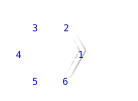
If you are in a Jupyter notebook, you should see a rendered image of benzene above. Chython molecules know how to display themselves as SVG images.
To get the canonical SMILES string back, simply convert to a string:
[4]:
print(str(benzene))
print(type(benzene))
c1ccccc1
<class 'chython.containers.molecule.MoleculeContainer'>
Let’s try a few more molecules:
[5]:
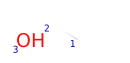
ethanol = smiles('CCO')
ethanol
[5]:
[6]:
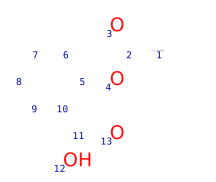
aspirin = smiles('CC(=O)Oc1ccccc1C(O)=O')
aspirin
[6]:
[7]:
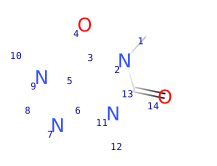
# Caffeine
caffeine = smiles('Cn1c(=O)c2c(ncn2C)n(C)c1=O')
caffeine
[7]:
3. Core Concepts: Atoms and Bonds#
A MoleculeContainer is the central data structure in chython. It stores atoms and bonds, and it is mutable – you can add, remove, or modify atoms and bonds.
Atom keys are arbitrary integers#
This is an important difference from array-based toolkits: atoms in chython are identified by integer keys, not by their position in a list. These keys can be any integers – they are not necessarily 0-based or sequential.
[8]:
mol = smiles('CCO')  # ethanol

# Iterate over all atoms: each gives (atom_number, atom_object)
for n, atom in mol.atoms():
    print(f'Atom {n}: {atom.atomic_symbol}, charge={atom.charge}, hydrogens={atom.implicit_hydrogens}')
Atom 1: C, charge=0, hydrogens=3
Atom 2: C, charge=0, hydrogens=2
Atom 3: O, charge=0, hydrogens=1
You can access a specific atom by its number:
[9]:
# Get the list of atom numbers first
atom_numbers = list(mol.atoms_numbers)
print('Atom numbers:', atom_numbers)

# Access a specific atom
first_atom = mol.atom(atom_numbers[0])
print(f'First atom: {first_atom.atomic_symbol}')
Atom numbers: [1, 2, 3]
First atom: C
Similarly, you can iterate over bonds:
[10]:
for n, m, bond in mol.bonds():
    print(f'Bond between atoms {n} and {m}: order={bond.order}')
Bond between atoms 1 and 2: order=1
Bond between atoms 2 and 3: order=1
Molecules are hashable and comparable#
You can use molecules in sets and dictionaries, and compare them for equality. Two molecules are equal if they have the same canonical SMILES:
[11]:
mol1 = smiles('CCO')   # ethanol
mol2 = smiles('OCC')   # ethanol, different SMILES, same molecule

print('mol1 == mol2:', mol1 == mol2)
print('Same hash:', hash(mol1) == hash(mol2))
mol1 == mol2: True
Same hash: True
[12]:
# You can use molecules in sets to remove duplicates
unique_mols = {smiles('CCO'), smiles('OCC'), smiles('C(O)C')}
print(f'Number of unique molecules: {len(unique_mols)}')
Number of unique molecules: 1
Warning: Do not modify a molecule (add/remove atoms or bonds) while it is stored in a set or used as a dictionary key. Modifications change the molecule’s hash, which will break the set/dict. Create a copy first if you need to modify.
Useful molecular properties#
Chython provides a number of computed properties out of the box:
[13]:
mol = smiles('CC(=O)Oc1ccccc1C(O)=O')  # aspirin

print(f'Molecular formula: {mol.brutto_formula}')
print(f'Molecular mass: {mol.molecular_mass:.2f}')
print(f'Total charge: {mol.molecular_charge}')
print(f'Number of atoms (heavy): {mol.atoms_count}')
print(f'Number of bonds: {mol.bonds_count}')
Molecular formula: C9H8O4
Molecular mass: 180.16
Total charge: 0
Number of atoms (heavy): 13
Number of bonds: 13
4. Standardization#
When you read molecules from different sources, they might represent the same functional groups in different ways. Standardization converts them to a consistent canonical form.
The all-in-one method: canonicalize()#
For most use cases, canonicalize() is all you need. It performs standardization, aromatization, and cleanup in one step:
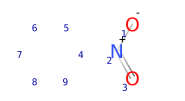
[14]:
mol = smiles('[O-][N+](=O)c1ccccc1')
print('Before:', str(mol))

mol.canonicalize()  # Returns True if something was changed
print('After: ', str(mol))
mol
Before: c1ccccc1[N+]([O-])=O
After:  c1ccccc1[N+]([O-])=O
[14]:
Individual standardization steps#
Under the hood, canonicalize() calls several methods. You can also call them individually when you need fine-grained control:
Method |
What it does |
|---|---|
|
Applies ~80 rules to normalize functional group representations |
|
Converts aromatic bonds to alternating single/double bonds (Kekule form) |
|
Converts Kekule form back to aromatic bonds (aromatic/Thiele form) |
|
Converts organic salts to neutral forms when possible |
|
Runs standardize + kekule + thiele + cleanup in the right order |
[15]:
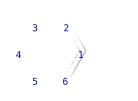
mol = smiles('C1=CC=CC=C1')  # benzene in Kekule form
print('Kekule form:', str(mol))

mol.thiele()  # convert to aromatic form
print('Aromatic form:', str(mol))
mol
Kekule form: C1=CC=CC=C1
Aromatic form: c1ccccc1
[15]:
Checking chemical validity#
Use check_valence() to verify that all atoms have valid valences. It returns a list of atom numbers with invalid valences (empty list means everything is fine):
[16]:
good_mol = smiles('CCO')
print('Valence errors in ethanol:', good_mol.check_valence())  # should be empty
Valence errors in ethanol: []
5. Substructure Search#
Chython has an elegant syntax for substructure searching using comparison operators.
The expression A < B means “A is a substructure of B” (i.e., B contains A):
[17]:
benzene = smiles('c1ccccc1')
toluene = smiles('Cc1ccccc1')
ethanol = smiles('CCO')

print('benzene < toluene:', benzene < toluene)   # True: benzene IS a substructure of toluene
print('toluene < benzene:', toluene < benzene)   # False: toluene is NOT a substructure of benzene
print('benzene < ethanol:', benzene < ethanol)    # False: no benzene ring in ethanol
benzene < toluene: True
toluene < benzene: False
benzene < ethanol: False
The full set of operators:
Expression |
Meaning |
|---|---|
|
A is a proper substructure of B (A is smaller and contained in B) |
|
A is a substructure of B (A is contained in B, or A equals B) |
|
A is a proper superstructure of B |
|
A is a superstructure of B |
Getting atom mappings#
To find out exactly which atoms match, use get_mapping(). It returns a generator of dictionaries mapping query atom numbers to molecule atom numbers:
[18]:
benzene = smiles('c1ccccc1')
toluene = smiles('Cc1ccccc1')

# Get the first mapping
mapping = next(benzene.get_mapping(toluene))
print('Mapping (benzene atom -> toluene atom):', mapping)
Mapping (benzene atom -> toluene atom): {1: 7, 2: 2, 3: 3, 4: 4, 5: 5, 6: 6}
SMARTS queries#
For more advanced pattern matching, you can use SMARTS – a query language that extends SMILES with wildcards and constraints. Import the smarts function to create query objects:
[19]:
from chython import smarts

# Match any carbonyl group (C=O)
carbonyl = smarts('[#6]=[#8]')

aspirin = smiles('CC(=O)Oc1ccccc1C(O)=O')
print('Has carbonyl:', carbonyl <= aspirin)

# Count the matches
mappings = list(carbonyl.get_mapping(aspirin))
print(f'Number of carbonyl groups found: {len(mappings)}')
Has carbonyl: True
Number of carbonyl groups found: 2
6. Reactions#
Chemical reactions are represented by ReactionContainer. The simplest way to create one is to parse a reaction SMILES. Reaction SMILES use >> to separate reactants from products, and . to separate individual molecules:
[20]:
# A simple esterification: acetic acid + methanol -> methyl acetate + water
rxn = smiles('[CH3:1][C:2](=[O:3])[OH:4].[CH3:5][OH:6]>>[CH3:1][C:2](=[O:3])[O:4][CH3:5].[OH2:6]')
rxn
[20]:
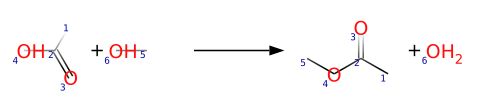
The numbers after the colons (:1, :2, etc.) are atom-to-atom mapping numbers (AAM). They tell you which atom in the reactants corresponds to which atom in the products. This information is essential for understanding how bonds change during the reaction.
You can access the individual parts of a reaction:
[21]:
print(f'Number of reactants: {len(rxn.reactants)}')
print(f'Number of products: {len(rxn.products)}')
print(f'Number of reagents: {len(rxn.reagents)}')

print('\nReactants:')
for r in rxn.reactants:
    print(f'  {str(r)}')

print('\nProducts:')
for p in rxn.products:
    print(f'  {str(p)}')
Number of reactants: 2
Number of products: 2
Number of reagents: 0

Reactants:
  O=C(O)C
  CO

Products:
  O=C(OC)C
  O
Like molecules, reactions are hashable and comparable. Their canonical SMILES (with sorted components) serve as the unique signature:
[22]:
print('Reaction SMILES:', str(rxn))
Reaction SMILES: CO.O=C(O)C>>O.O=C(OC)C
7. File I/O#
Chython can read and write common chemical file formats. The two most important are:
SDF (Structure Data File): for collections of molecules
RDF (Reaction Data File): for collections of reactions
Reading files#
File readers are used as context managers (with the with statement). They iterate over records in the file:
[23]:
from chython import SDFRead, SDFWrite, RDFRead, RDFWrite

# Reading an SDF file (example -- you would use your own file path)
# with SDFRead('molecules.sdf') as reader:
#     for molecule in reader:
#         print(str(molecule))

# Reading an RDF file
# with RDFRead('reactions.rdf') as reader:
#     for reaction in reader:
#         print(str(reaction))
Writing files#
Writers work similarly:
[24]:
# Writing molecules to an SDF file
# with SDFWrite('output.sdf') as writer:
#     writer.write(smiles('c1ccccc1'))
#     writer.write(smiles('CCO'))

# Writing reactions to an RDF file
# with RDFWrite('output.rdf') as writer:
#     writer.write(rxn)
Readers also support compressed files (gzip, bz2) and network streams. You can pass any file-like object opened in text mode.
8. The CGR Concept (Key for SynPlanner)#
The Condensed Graph of Reaction (CGR) is a central concept in chython and the foundation of how SynPlanner works.
What is a CGR?#
A CGR takes a chemical reaction and overlays the reactants and products into a single graph. Atoms are matched using atom-to-atom mapping. The result is a molecule-like graph where:
Static bonds appear the same in reactants and products (nothing changed)
Dynamic bonds are bonds that formed or broke during the reaction (the reaction center)
This lets you represent an entire reaction transformation as a single graph, which is useful for pattern matching and machine learning.
[25]:
# Parse a reaction with atom mapping
rxn = smiles('[CH3:1][C:2](=[O:3])[OH:4].[CH3:5][OH:6]>>[CH3:1][C:2](=[O:3])[O:4][CH3:5].[OH2:6]')
print('Reaction:')
print(str(rxn))
Reaction:
CO.O=C(O)C>>O.O=C(OC)C
[26]:
# Create the CGR
cgr = rxn.compose()
cgr
[26]:
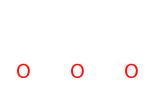
In the CGR depiction, dynamic bonds (bonds that changed during the reaction) are shown differently from static bonds. You can inspect the reaction center programmatically:
[27]:
print('Reaction center atoms:', cgr.center_atoms)
print('Reaction center bonds:', cgr.center_bonds)
Reaction center atoms: (4, 5, 6)
Reaction center bonds: ((4, 5), (5, 6))
You can also go back from a CGR to a reaction:
[28]:
# Decompose CGR back into a reaction
rxn_from_cgr = ReactionContainer.from_cgr(cgr)
print('Reconstructed reaction:', str(rxn_from_cgr))
Reconstructed reaction: CO.O=C(O)C>>O.O=C(OC)C
Why CGRs matter for SynPlanner#
SynPlanner uses CGRs extensively:
Reaction rules extraction: Reaction rules are generalized CGR patterns extracted from known reactions. They capture what kind of bonds change without being tied to specific molecules.
Substructure matching on CGRs: Just like you can search for a benzene ring inside a molecule, you can search for a reaction pattern (CGR) inside a full reaction CGR. This is how SynPlanner matches rules to target molecules.
Reaction fingerprints: CGRs can be fingerprinted for machine learning, enabling policy networks to rank which reaction rules are most likely to apply.
Understanding CGRs is not required to use SynPlanner, but it helps you understand what is happening under the hood.
9. Glossary#
Here are key terms you will encounter in chython and SynPlanner documentation:
Term |
Definition |
|---|---|
AAM |
Atom-to-Atom Mapping – the correspondence between atoms in reactants and products. Shown as numbers after colons in SMILES (e.g., |
CGR |
Condensed Graph of Reaction – a single graph that overlays reactants and products, showing which bonds form and break. |
SMILES |
Simplified Molecular-Input Line-Entry System – a text notation for molecules (e.g., |
SMARTS |
SMILES Arbitrary Target Specification – an extension of SMILES for specifying substructure search patterns with wildcards and constraints. |
Dynamic bonds |
Bonds that change during a reaction – they either form or break. Visible in CGRs. |
Reaction center |
The atoms and bonds directly involved in a chemical transformation. |
Building blocks |
Commercially available starting materials used in synthesis. |
Synthon |
A molecular fragment resulting from a retrosynthetic disconnection of a target molecule. |
Kekule form |
Representation of aromatic rings with explicit alternating single and double bonds (e.g., |
Thiele/aromatic form |
Representation using aromatic bonds (e.g., |
SDF |
Structure Data File – a standard file format for storing collections of molecules. |
RDF |
Reaction Data File – a standard file format for storing collections of reactions (not to be confused with the semantic web RDF). |
What’s Next?#
You now have a solid foundation in chython. Here are some suggested next steps:
02 Data Curation: Learn how to prepare reaction datasets for retrosynthetic planning.
05 Retrosynthetic Planning: See chython in action – plan synthesis routes for real drug molecules.
The chython documentation at the project repository for more advanced features like the Reactor, query building, and fingerprints.
Happy chemistry!